llms.txt for Shopify: What It Does and How to Customize It
Every Shopify store already has an llms.txt file. Since May 28, 2026, Shopify serves a default agents.md file at /agents.md on every store, and the /llms.txt and /llms-full.txt paths point to the same content by default. You do not need an app to create one. What you can decide is whether the Shopify generated version is enough, or whether you want to customize it with a theme template. For most stores, Shopify's own documentation says the managed file is all you need. This guide explains what llms.txt is, what Shopify's version contains, how to customize it safely, and what it will and will not do for your visibility.
What llms.txt Is
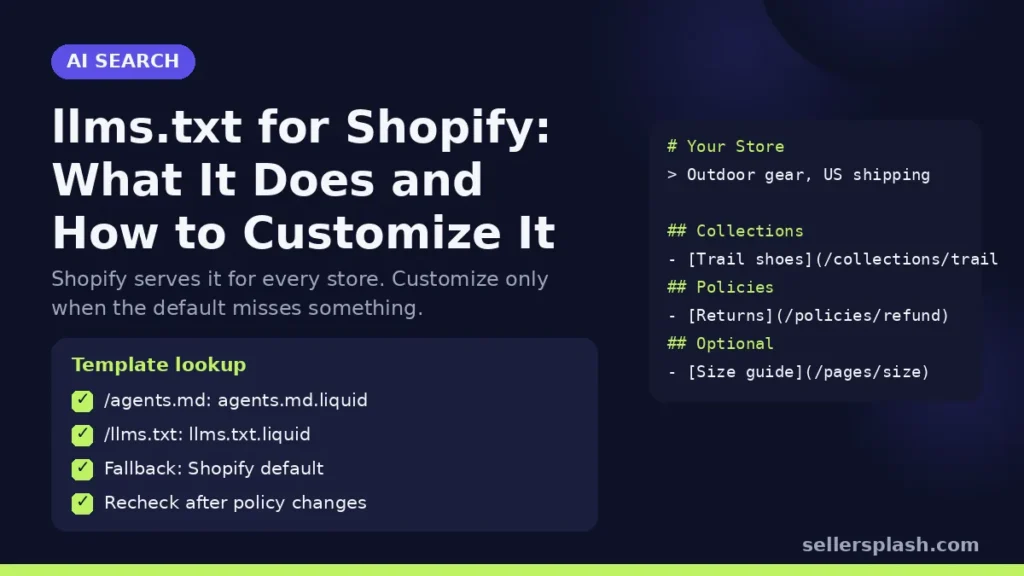
llms.txt is a proposed standard for a Markdown file that gives AI agents a short, curated overview of a site with links to more detailed pages. The proposal describes a simple format: an H1 with the site name (the only required section), a short blockquote summary, optional notes, and sections headed with H2 that list links, each with an optional description. A section called "Optional" is used by convention for secondary links an agent can skip.
The proposal is clear about its purpose. robots.txt tells automated tools what access is acceptable. llms.txt is meant to be used on demand, when an agent needs information about a topic while helping a user. Its author notes it has mostly been used that way, for inference rather than training, and that it is most heavily used for software documentation.
What Shopify's agents.md and llms.txt Contain
Shopify's agents.md template documentation calls agents.md "the canonical, agent-facing description of a store." According to Shopify, the default file tells AI agents and shopping assistants how to discover and transact with the store, including:
- The store's Universal Commerce Protocol discovery and Model Context Protocol endpoints
- Read only browsing URLs for product, collection and search data
- The store's published policies
- Guidance for personal shopping agents
Shopify says /llms.txt and /llms-full.txt are alternate URLs that mirror /agents.md by default, so agents that request either one still find a usable document. The file is served at the bare primary domain, without a locale or Markets subfolder.
Should You Customize It?
Shopify recommends adding a custom template only when you have advanced requirements the managed file does not cover, and warns that once you add one, you are responsible for keeping its content current. That is the real trade off: the default stays in sync with your store's commerce configuration automatically, and a hand written file can go stale the day you change a policy.
| Situation | Recommendation |
|---|---|
| Standard store, policies set in the admin | Keep the Shopify generated default |
| You want to add buying guides, sizing help or brand context | Consider a custom llms.txt.liquid that links to those pages, and keep agents.md as the default |
| A third party app used to serve your llms.txt | Check what /llms.txt shows now; Shopify serves its own content at these paths |
| Headless or complex multi store setup | Work with a developer on agents.md.liquid |
How to Customize llms.txt on Shopify: 5 Steps
1. Look at what your store serves today
Open yourstore.com/agents.md and yourstore.com/llms.txt in a browser. Check that your policies, contact details and store name are right. If something is wrong, fix it at the source in the admin first, since the default file reads from your store settings.
2. Choose the right template
Shopify's changelog lists three templates you can add under Online Store, then Themes, then Edit code: templates/agents.md.liquid controls /agents.md and is the default for the other two paths, templates/llms.txt.liquid controls /llms.txt only, and templates/llms-full.txt.liquid controls /llms-full.txt only. If a template is missing for a path, Shopify falls back to agents.md.liquid and then to its own generated default.
3. Create the file in your theme
In the theme code editor, right click the Templates folder, choose New File and name it exactly, for example llms.txt.liquid. Shopify notes that the agents.md template cannot be a JSON template, and that it renders with a restricted Liquid context in which only the request and agents objects are available, so you cannot pull in arbitrary theme settings.
4. Follow the llms.txt format
Start with an H1 for your store name and a one line blockquote summary. Add a short paragraph of key facts, then H2 sections that link to your most useful pages, such as collections, buying guides, shipping and returns, with a short note on each. Keep it small: the proposal's point is a file that fits in an agent's context, with detail behind the links.
5. Re check it after every policy or catalog change
A custom file is a promise to maintain it. Put it on the same checklist as your shipping and return policy pages, and recheck the live URL after theme updates.
Does llms.txt Help SEO or AI Visibility?
Be careful with claims here. Google says in its guidance on AI features and your website that you don't need to create new machine readable files, AI text files or markup to appear in AI Overviews or AI Mode, and that no special schema.org structured data is needed. For Google, llms.txt is not a ranking factor.
For AI agents that browse a store on a shopper's behalf, a clear agents.md or llms.txt can make the store easier to understand, which is why Shopify ships one. But the inputs that decide whether ChatGPT or Gemini recommends your products are mostly elsewhere: crawler access, product data, reviews and useful content. Our guide on getting your store recommended by ChatGPT covers those.
Quick Checklist
- /agents.md and /llms.txt load and show correct store details
- Policies complete in the Shopify admin
- Custom template added only if the default is missing something you need
- Custom file follows the llms.txt format and stays short
- Recheck after policy changes and theme updates
- Crawler access and product data handled separately
Where an Agency Fits
llms.txt is a small piece of AI visibility. The bigger pieces are product data, Shopify Catalog eligibility and content AI assistants can cite, which we covered in our AI SEO for Shopify guide. Our AI search optimization service handles all of it for stores that want it done for them.
Want to know how AI agents read your store? The Full AI Visibility Audit ($99) includes a site scan of AI crawler access, and the Deep Growth Audit ($249) adds search, traffic and product feed checks with a 90 day plan.
Frequently Asked Questions
Does my Shopify store have an llms.txt file?
Yes. Shopify serves a default agents.md file at /agents.md on every store, and /llms.txt and /llms-full.txt point to the same content by default.
Do I need an app to create llms.txt on Shopify?
No. Shopify generates the file itself. You can customize it by adding a llms.txt.liquid or agents.md.liquid template to your theme, but Shopify says the managed file is all most stores need.
How do I edit llms.txt on Shopify?
Go to Online Store, then Themes, then Edit code, and add templates/llms.txt.liquid. It controls /llms.txt only. Without it, Shopify falls back to agents.md.liquid and then to its generated default.
Does llms.txt help Google rankings?
No. Google says you don't need new machine readable files, AI text files or special markup to appear in AI Overviews or AI Mode.
What is the difference between agents.md and llms.txt on Shopify?
Shopify calls agents.md the canonical, agent facing description of a store. The /llms.txt and /llms-full.txt URLs mirror it by default so agents that request either one still find a usable document.
What should a custom llms.txt include?
Follow the llms.txt proposal: an H1 with your store name, a short blockquote summary, a few key facts, and H2 sections linking to your most useful pages, such as collections, guides, shipping and returns.
AI search and ads readiness checklist
25 checks for Amazon, Walmart and Shopify sellers: tracking, product feeds, Google, Bing and Meta ads, and getting cited by ChatGPT, Perplexity and Google AI Overviews. Two pages, about 20 minutes.
- Break-even ROAS table by margin
- The AI search (AEO) checks most stores miss
- A simple score that tells you what to fix first
No spam. We use your email to send the checklist and follow up about it.
Want to see where your store stands in AI search? Get the Full AI Visibility Audit for $99 or the Deep Growth Audit for $249.
Get your AI visibility audit