AI SEO for Shopify: Get Found in ChatGPT and Gemini
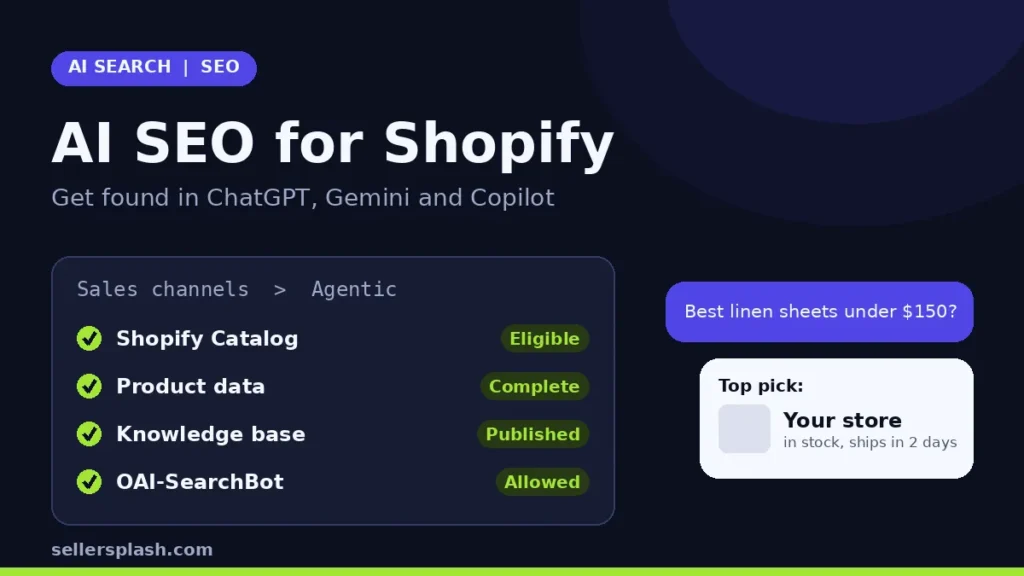
AI SEO for Shopify comes down to four jobs: make sure your store is eligible for Shopify Catalog, give every product complete and accurate data, publish the facts AI agents use to answer questions about your store, and keep AI search crawlers allowed. Shopify's agentic storefronts already send eligible products to ChatGPT, Google AI Mode and Gemini, Microsoft Copilot and Meta, and on October 28, 2026 Shopify's Fall '26 Edition added two tools that make this easier to manage from the admin. This guide walks through what changed and the exact steps to take.
What Shopify Changed on October 28, 2026
The Fall '26 Edition added two things that matter for AI visibility:
- Catalog eligibility view. The admin now shows whether a store is eligible for Shopify Catalog and links to fixes for anything in the way.
- Knowledge base. A new page at Sales channels, then Agentic, lets you review and publish the facts agents get about your store, such as return windows, shipping destinations and gift services. Shopify drafts the facts from your storefront and suggests updates for you to review.
Shopify's reason is simple: ChatGPT, Copilot, Meta and other AI agents get product information from Shopify Catalog, so a store that is not in the Catalog is invisible to those agents through that route. The same release also says products with Shop Promise badges can rank higher in the Shopify Catalog data that shopping agents use.
How Shopify Products Reach ChatGPT, Gemini and Copilot
According to Shopify's help center, eligible products become discoverable by AI channels in three ways: through Shopify Catalog, through web crawling and indexing, and through product feeds you already share for other purposes, such as Google advertising. Products reach Google AI Mode and Gemini through the Google and YouTube sales channel or Google Merchant Center.
The buying experience differs by channel. Shopify describes ChatGPT as a discovery channel: shoppers find products in ChatGPT, then complete the purchase on your own online store checkout, and Shopify says there are no extra fees for selling there beyond your standard payment processing fees. For Google AI Mode and Gemini, Microsoft Copilot and Meta, shoppers can buy inside the AI channel when direct checkout is turned on. Either way, Shopify says orders from AI channels show channel or referrer attribution in your admin, and you keep the customer relationship.
7 Steps to Optimize a Shopify Store for AI Search
1. Check Shopify Catalog eligibility first
Go to Sales channels, then Agentic, and look at Sources, then Shopify Catalog. An eligible store shows the number of products in the Catalog. An ineligible one shows an Ineligible warning you can click for the reason. Shopify's Catalog requirements include:
- The store is on the Starter plan or higher and is not in private (password) mode.
- Each product has a title, at least 1 image and a price greater than 0.
- Products are published to the online store, Hydrogen or Headless channel with an identifiable product URL.
- Products are not Unlisted and not hidden from search engines.
Shopify also reviews account standing over time, including verified email, two step authentication, genuine sales history and prompt fulfillment. If your store is ineligible, fix this before anything else, because the rest of the work depends on it.
2. Fill in the product fields AI platforms read
Shopify's guide to optimizing products for AI platforms lists the fields AI platforms and shopping sites consider: title, description, images, product type, vendor, collections, tags, barcode (GTIN, UPC or ISBN) and variants with option names. In practice that means:
- Write titles that name the product, the brand and the key attribute a shopper would type, such as material, size or use.
- Answer real buying questions in the description: who it is for, what is included, dimensions, materials and care.
- Add GTINs wherever the product has one, and use clear option names like Size and Color instead of Option 1.
- For ChatGPT, Shopify asks merchants to place any relevant legal disclosures in the first 6,000 characters of the product description.
3. Map custom data so agents get the right values
If your best product copy lives in metafields, metaobjects or tags, use the Channel mapping page to tell Shopify Catalog where to pull titles and descriptions from, and group separate products that are really variants of one item. The same page lets you choose whether the Catalog uses the price or the compare at price as the list price, which affects whether agents can show strikethrough sale pricing. Shopify explains both options in its Catalog and product discovery guide.
4. Publish your knowledge base
Product data answers "what should I buy." The knowledge base answers "can I trust this store": returns, shipping, contact details and brand facts. Shopify notes that facts it generates from a scan of your storefront stay unpublished until you publish them, while facts linked to your admin, such as store policies and contact details, are published when Shopify creates them. The knowledge base holds up to 1,000 facts and is publicly available to AI channels through the Storefront MCP. Read every drafted fact before you publish it, and make sure your store policies are complete, since that is what an agent will quote when a shopper asks about returns.
5. Keep AI search crawlers allowed
Shopify Catalog is the main source, but AI crawlers also read your store directly. Shopify lets you change crawler rules through the robots.txt.liquid template, and it automatically serves /agents.md, /llms.txt and /llms-full.txt for every store, with no app needed. On the ChatGPT side, OpenAI's crawler documentation says sites that opt out of OAI-SearchBot will not be shown in ChatGPT search answers, and that robots.txt changes can take about 24 hours to take effect. If you want to limit AI training without disappearing from AI answers, our guide to the AI training opt out in robots.txt shows how to separate the two.
6. Cover Google AI Overviews and AI Mode with classic SEO
Google's page on AI features and your website says there are no extra technical requirements for AI Overviews or AI Mode: a page must be indexed and eligible to show in Search with a snippet. Google lists the fundamentals that still apply, including allowing crawling, internal links, important content in text form, structured data that matches the visible page, and an up to date Merchant Center and Business Profile. For the feed side, see our Google Shopping feed optimization guide.
7. Measure what AI channels send you
Check order attribution in your Shopify admin for orders from AI channels. For Google, the same Google page explains that clicks from AI Overviews and AI Mode are counted in the Search Console Performance report under the Web search type, so they sit inside your normal search numbers. Review both monthly and note which product pages get cited or clicked.
Quick Checklist
- Catalog shows a product count, not Ineligible
- Every product has a title, image, price above 0 and GTIN where available
- Descriptions answer fit, size, material and care questions
- Channel mapping set if your copy lives in metafields
- Knowledge base facts reviewed and published
- Store policies complete and current
- OAI-SearchBot and other AI search crawlers allowed in robots.txt
- Merchant Center feed and Business Profile up to date
Where an Agency Fits
Most of these steps are settings and data work, and a small catalog can be done in an afternoon. The harder part is the content AI assistants cite when shoppers compare options: clear buying guides, comparison pages and answers to the questions people actually ask. Our answer engine optimization guide covers that side, and our AI search optimization service handles product data, crawler access, structured data and content for stores that want it done for them.
Want to know where your store stands in AI search? The Full AI Visibility Audit ($99) includes a site scan of AI crawler access, and the Deep Growth Audit ($249) adds search, traffic and product feed checks with a 90 day plan.
Frequently Asked Questions
Do I need an app to get my Shopify store into ChatGPT?
No. Shopify says you don't need to do anything for your products to be discovered by ChatGPT through Shopify Catalog, as long as your store is eligible. Shopify also serves /agents.md, /llms.txt and /llms-full.txt for every store automatically, so you don't need a third party app to create those files.
Does Shopify charge a fee for sales that come from ChatGPT?
Shopify's help center says there are no fees associated with selling in ChatGPT and that you pay only your standard payment processing fees. ChatGPT sends shoppers to your own online store checkout to buy.
Why does my store show Ineligible for Shopify Catalog?
Common reasons include a store on a plan below Starter, a password protected store, products with no image or a price of 0, and products that are unlisted or hidden from search engines. Click Ineligible in Sales channels, then Agentic, to see the exact reason Shopify lists for your store.
What is the Shopify knowledge base for AI agents?
It is a page under Sales channels, then Agentic, in the Shopify admin where you review and publish facts about your store, such as return windows, shipping timelines and brand values. AI agents can query those facts to answer shopper questions. It holds up to 1,000 facts.
Is AI SEO for Shopify different from regular SEO?
Mostly it builds on it. Google says the same SEO fundamentals apply to AI Overviews and AI Mode, with no extra technical requirements beyond being indexed and eligible for a snippet. The new part on Shopify is the product feed to AI channels through Shopify Catalog and the knowledge base.
Can I block AI agents from showing some of my products?
Yes. You can remove Shopify Catalog access for ChatGPT or Microsoft Copilot in Sales channels, then Agentic. Shopify notes that products may still appear through other routes, such as web crawling, and links to separate steps for hiding products from AI channels completely.
AI search and ads readiness checklist
25 checks for Amazon, Walmart and Shopify sellers: tracking, product feeds, Google, Bing and Meta ads, and getting cited by ChatGPT, Perplexity and Google AI Overviews. Two pages, about 20 minutes.
- Break-even ROAS table by margin
- The AI search (AEO) checks most stores miss
- A simple score that tells you what to fix first
No spam. We use your email to send the checklist and follow up about it.
Want to see where your store stands in AI search? Get the Full AI Visibility Audit for $99 or the Deep Growth Audit for $249.
Get your AI visibility audit