AI Training Opt Out in robots.txt: What Stores Should Do
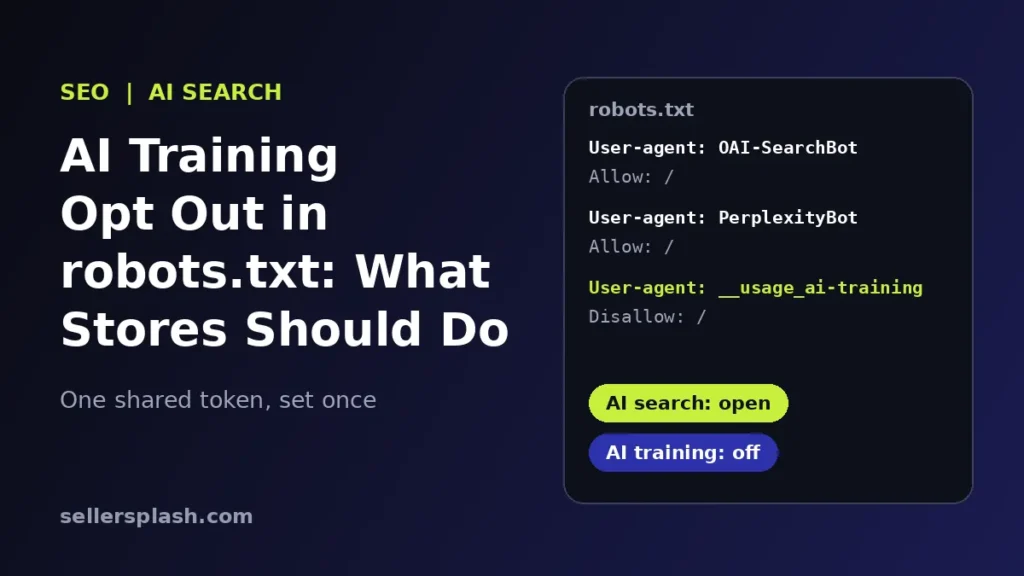
To opt out of AI training in robots.txt, add a group for the new shared policy token __usage_ai-training with a Disallow rule, and keep the AI search crawlers, such as OAI-SearchBot and PerplexityBot, allowed. On October 30, 2026, Google announced plans to support this shared AI training control, which lets a site set one training preference across participating AI providers instead of writing a rule for each company. Google says it aims to support it with other providers in 2027, so today it is a preference you can set early, not a switch that works everywhere yet.
For ecommerce brands, the real risk is not training. It is accidentally blocking the bots that put your products in ChatGPT, Perplexity and Gemini answers. This guide explains what Google announced, how the token works, which bot does what, and the exact steps we would take on a store this week.
Quick Answer
- What is new: a shared robots.txt policy token,
__usage_ai-training, from the IETF AIPREF draft, that expresses one AI training preference for every provider that adopts it. - Google's position: if you opt out with the token and do not name Google-Extended, Google plans to treat it as a Google-Extended disallow, per its October 30 announcement.
- Timing: Google aims to support the control along with other AI providers in 2027.
- Search is separate: Google-Extended does not affect inclusion or ranking in Google Search.
- The trade off: blocking Google-Extended also covers grounding in Gemini Apps, so a blanket opt out can cost you Gemini visibility.
What Google Announced on October 30, 2026
In a post on the Google Search Central blog, John Mueller wrote that Google plans to support a shared AI training control in robots.txt. It is based on work from the AI Preferences (AIPREF) working group at the Internet Engineering Task Force, and it builds on Google-Extended, the training control Google has offered since 2023.
Four details matter for site owners:
- One signal, many providers. Website owners can use a shared policy token in robots.txt to set broad preferences across participating AI providers, instead of managing separate instructions for each AI developer.
- Google maps it to Google-Extended. When the token opts out of training and Google-Extended is not explicitly named, Google plans to read it as if you had disallowed Google-Extended.
- Company rules still work. Existing company specific controls keep functioning beside the shared signal, so you can set a broad choice and still tailor rules for one provider.
- Allowing Google-Extended has a benefit. Google says sites that specifically allow Google-Extended are eligible to appear in responses and receive clicks via grounding in Gemini Apps.
Google also notes the proposal is consistent with the EU Code of Practice for General Purpose AI model providers, which recognizes robots.txt as a primary way for publishers to state machine readable preferences.
How the __usage_ai-training Token Works
The IETF draft adds no new robots.txt directives. It reuses the normal format: you write a group whose User-Agent line is the policy token, then use Disallow and Allow on paths. A Disallow means a preference against AI training for those paths, and an Allow means a preference in favor. The draft's own example:
User-Agent: __usage_ai-training
Disallow: /
Allow: /press-kit/
That says no AI training on the whole site, except the press kit. A few rules from the draft are easy to miss:
- Wildcards do not count. A
User-Agent: *group must not be read as matching the training token. If no group names__usage_ai-training, no preference has been expressed. - It is not a crawl block. The token states a usage preference. To limit crawling itself, you still write groups for specific crawlers.
- Specific beats general. Specific expressions should take precedence over general ones, and private agreements may override the preference.
- It is still a draft. The document is an Internet-Draft, a work in progress that can change before it becomes a standard.
Training Bots vs AI Search Bots: Which Does What
A common mistake is treating every AI bot the same. The major providers separate training from search, and their own documentation says so:
| Token | Provider | What it controls | Block it if |
|---|---|---|---|
| Google-Extended | Use of your content to train future Gemini models and for grounding in Gemini Apps. No effect on Google Search (source) | You accept losing Gemini Apps grounding to stop Gemini training | |
| GPTBot | OpenAI | Crawling for training OpenAI's generative AI foundation models (source) | You do not want OpenAI training on your pages |
| OAI-SearchBot | OpenAI | Showing your site in ChatGPT search answers (source) | Almost never for a store that wants AI traffic |
| PerplexityBot | Perplexity | Surfacing and linking your site in Perplexity search results, not used for foundation model training (source) | Almost never for a store that wants AI traffic |
| __usage_ai-training | Shared (IETF draft) | A training preference for every provider that adopts it (source) | You want one broad training opt out, now or when support arrives |
OpenAI says sites opted out of OAI-SearchBot will not be shown in ChatGPT search answers, and that it can take about 24 hours after a robots.txt update for its systems to adjust (OpenAI). Perplexity also says its Perplexity-User agent, which fetches a page when a person asks a question, generally ignores robots.txt because the fetch was requested by a user (Perplexity). robots.txt is a stated preference, not a lock.
How to Set Your AI Training Preference: 6 Steps
- Decide the goal by page type. Write down which content you want AI assistants to know (products, collections, buying guides, shipping and return policies) and which you consider proprietary (original research, paid downloads). The draft supports path level preferences, so you do not have to choose one answer for the whole site.
- Audit your current file. Open yoursite.com/robots.txt. Look for old rules that block OAI-SearchBot, PerplexityBot or every bot with a wildcard. A copied "block all AI" snippet can quietly remove you from AI search answers.
- Keep search and answer bots open. Leave Googlebot, OAI-SearchBot and PerplexityBot allowed for the pages you want recommended. Google's robots.txt introduction explains how groups and paths are matched.
- Set provider training rules you want today. Add a GPTBot group if you want to opt out of OpenAI training. Think twice before disallowing Google-Extended site wide, because it also covers grounding in Gemini Apps.
- Add the shared token for the future. Parsers that do not know the token ignore it, per the draft, so adding a
__usage_ai-traininggroup now is low risk. If you want to stay in Gemini Apps answers, explicitly allow Google-Extended so Google does not map your training opt out onto it. - Test, then recheck. Use the robots.txt report in Search Console to confirm Google fetched your file without errors, and ask for a recrawl in an emergency. Recheck the rules when Google and other providers confirm support.
Here is a sample file for a store that wants AI search visibility but no OpenAI training and no training on a research section. Adjust paths to your site before using it:
# Keep AI search and answer engines able to find you
User-agent: OAI-SearchBot
Allow: /

User-agent: PerplexityBot
Allow: /

# Opt out of OpenAI model training
User-agent: GPTBot
Disallow: /

# Shared AI training preference (IETF draft)
User-agent: __usage_ai-training
Disallow: /research/
Allow: /
Note that this sample does not name Google-Extended. Under Google's stated plan, the opt out in the training token group would then also count as a Google-Extended opt out. If Gemini Apps visibility matters more to you than Gemini training, add an explicit User-agent: Google-Extended group with Allow: /.
What This Means for Ecommerce Brands
For a store, being understood by AI assistants is usually a sales channel, not a threat. When a shopper asks ChatGPT or Perplexity which product to buy, the search bots decide whether your pages can be found and cited. Training rules decide something narrower: whether future models learn from your text. Mixing the two up is how brands disappear from AI answers without noticing.
This also sits beside the Search Console switch we covered in our guide to the Search generative AI control, which removes a site from AI Overviews and AI Mode. That one is about display in Google's AI features, and the new token is about training. If you want the bigger picture on getting cited, our answer engine optimization guide covers the content side, and our AI search optimization service handles crawler access, structured data and content for you.
Not sure whether your robots.txt is blocking AI search? The Full AI Visibility Audit ($99) includes a site scan of AI crawler access, and the Deep Growth Audit ($249) adds search, traffic and product feed checks with a 90 day plan.
Frequently Asked Questions
What is the shared AI training control in robots.txt?
It is a proposed industry signal from the IETF AIPREF working group. Instead of writing a separate rule for every AI company, a site adds one robots.txt group for the policy token __usage_ai-training and uses Disallow or Allow to say whether its pages may be used to train generative AI models. Google announced on October 30, 2026 that it plans to support it.
When will Google support the new AI training token?
Google says it aims to support the control along with other AI providers in 2027 and will share updates on its progress. Until then, Google-Extended remains the control Google honors for Gemini training today.
Does opting out of AI training hurt my Google rankings?
No. Google states that Google-Extended does not affect a site's inclusion in Google Search and is not used as a ranking signal. The IETF draft also says the training token is not a crawling directive, so Googlebot keeps crawling and ranking your pages as before.
Will blocking GPTBot remove my store from ChatGPT search?
Not on its own. OpenAI uses GPTBot for training and OAI-SearchBot for ChatGPT search, and says each setting is independent. Sites that block OAI-SearchBot are not shown in ChatGPT search answers, so keep OAI-SearchBot allowed if you want to be recommended there.
Does User-agent: * Disallow count as an AI training opt out?
Not under the new proposal. The IETF draft says wildcard groups must not be read as matching the __usage_ai-training token. If no group names that token, no training preference has been expressed. A blanket wildcard block would also stop search crawlers, which most stores do not want.
Should an ecommerce store opt out of AI training?
In our view, most stores should not block everything. Product pages, guides and policies are the content you want AI assistants to understand. A path level approach usually fits better: keep shopping pages open and opt out only for content you consider proprietary, such as original research or paid resources.
AI search and ads readiness checklist
25 checks for Amazon, Walmart and Shopify sellers: tracking, product feeds, Google, Bing and Meta ads, and getting cited by ChatGPT, Perplexity and Google AI Overviews. Two pages, about 20 minutes.
- Break-even ROAS table by margin
- The AI search (AEO) checks most stores miss
- A simple score that tells you what to fix first
No spam. We use your email to send the checklist and follow up about it.
Want to see where your store stands in AI search? Get the Full AI Visibility Audit for $99 or the Deep Growth Audit for $249.
Get your AI visibility audit