Search Generative AI Control: Should Your Store Opt Out?
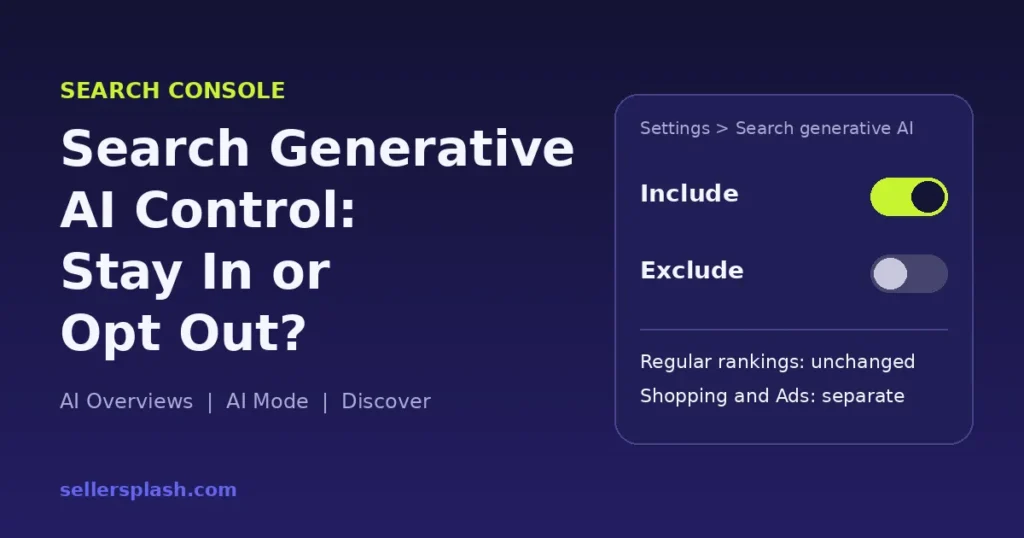
For most ecommerce stores, the answer is no: keep your site included. Google's Search generative AI control, found in Search Console under Settings > Search generative AI, removes your links and content from AI Overviews, AI Mode and the generative AI features in Discover, according to Google's help page. It does not lift your regular rankings, it does not change Merchant Center or Google Ads, and it does not stop AI training. Your competitors stay in the answer while you leave it.
On October 21, 2026, Google updated its documentation on controlling what you share with Google Search so the Search generative AI control now sits next to the robots meta tag, data-nosnippet and X-Robots-Tag. This guide explains what each control does, when an opt out can make sense, and the steps to decide with data instead of a hunch.
Quick Answer
- Where it lives: Search Console, Settings > Search generative AI. The default for every property is "Include," per Google.
- What "Exclude" does: your links and content stop appearing in AI Overviews, AI Mode and Discover's AI features, and your content is no longer used to ground those AI answers.
- What it does not do: it is not a ranking signal for the rest of Search, it does not override Merchant Center or Google Ads, and it does not control AI training. That is the job of Google-Extended.
- Measure first: the Generative AI performance report shows how often your pages appear in these features before you touch the switch.
Google's Content Controls Compared
Each control below comes from Google's own documentation. They are easy to mix up, and choosing the wrong one can remove far more than you meant to.
| Control | What it removes | Where you set it |
|---|---|---|
| Search generative AI control | Your links and content in AI Overviews, AI Mode and Discover's AI features. Regular results stay. (source) | Search Console settings, per property |
nosnippet |
Text snippets in all search results, including AI Overviews and AI Mode, and use of the page as a direct input for those features. (source) | Robots meta tag or X-Robots-Tag, per page |
data-nosnippet |
Only the marked sections of a page from snippets. (source) | HTML attribute on specific elements |
max-snippet |
Limits snippet length and how much content can be used as a direct input for AI Overviews and AI Mode. (source) | Robots meta tag, per page |
| Google-Extended | Use of your content for training future Gemini models and for grounding in Gemini Apps and Vertex AI. No effect on Google Search inclusion. (source) | robots.txt |
noindex |
The whole page from Google Search. (source) | Robots meta tag, per page |
What Changed on October 21, 2026
Google's Search Central changelog says it refreshed the control what you share with Google Search page to include existing options: the robots meta tag, data-nosnippet, X-Robots-Tag and the Search generative AI control. The page now lists the control as a site-wide method to manage your site's inclusion in generative AI features on Google Search, including AI Overviews and AI Mode.
The control itself is not brand new. Google's help page notes it rolled out to all websites worldwide as of August 31, 2026, and Search Engine Journal reported that it followed a UK Competition and Markets Authority requirement for more publisher control over generative AI. What changed this week is that Google now presents it as a standard content control, which means more site owners will notice it and ask whether to use it.
What Happens If You Exclude Your Site
Google's help page spells out the effects:
- Links to your site and your content will not appear in Search generative AI features, and you "won't receive any traffic or impressions from these features."
- Content crawled from your site will not be eligible as an input for AI responses or previews in those features.
- "Content from other sites will still be available in those features, and it may appear similar to yours."
- Your content may still be used to power Google Search as a whole, such as helping Google understand the language of queries and pages.
- Changes generally take a few days. Content is excluded within 1 to 2 days after the control goes live, though caching can delay some pages.
That third point is the one that matters for a store. When a shopper asks AI Mode which product to buy, the answer still gets written. If you opt out, it simply gets written from your competitors' pages.
Should an Ecommerce Store Opt Out?
Reasons to stay included
- No reward for leaving. Google says the control is not a ranking or inclusion signal elsewhere in Search, so excluding your site does not boost your blue links.
- The slot gets filled. Other sites stay in the answer, and Google warns their content may look similar to yours.
- Shopping is separate anyway. The control does not override Merchant Center or Google Ads, so opting out does not protect your product listings from anything. It only removes your organic voice in AI answers.
Cases where a narrower control can make sense
- Content you do not want quoted. For a specific block of text, such as wholesale terms or a members-only offer,
data-nosnippetkeeps that section out of snippets without pulling your whole site from AI features. - One section of the site. The control works by Search Console property. Google's help page explains that a URL-prefix child property, such as
https://example.com/blog/, can override its parent's setting. That lets you treat one folder differently instead of the whole domain. - Training, not Search. If your real concern is your content training Gemini models, that is Google-Extended in robots.txt. Turning off AI Overviews will not address it.
How to Decide in 6 Steps
- Open the Generative AI performance report. Google's report shows impressions from AI Overviews and AI Mode by page, country, device and date. Google introduced it in June 2026 and rolled it out to all sites on August 31. If it says there is not enough data, your site may already get very few AI impressions, or it may already be excluded.
- Check your current setting. Go to Settings > Search generative AI. Include is the default, and child properties inherit from their parent unless someone changed them.
- List which pages appear. Export the pages tab. Product, category and buying guide pages that show up here are the ones shoppers already see inside AI answers.
- Pick the narrowest tool. Use
data-nosnippetfor a paragraph, a robotsmetarule for one page, a URL-prefix property for a folder, and the site-wide control only if you truly want out everywhere. - Keep Shopping and ads decisions separate. Review those in Merchant Center and Google Ads, since the AI control does not change them.
- Recheck after any change. Give it a few days, then compare the report against your baseline before deciding whether to keep the setting.
Staying included is only half the job. Your pages still need to be the ones AI features choose to cite. Our guide to answer engine optimization covers how to structure product and guide pages for that, and our breakdown of the October 2026 AI Overviews links update shows how Google now displays source links. If you want a team to handle it, see our AI search optimization service.
Want to know if AI Overviews and ChatGPT already mention your store? Get the Full AI Visibility Audit ($99) for the full picture, or the Deep Growth Audit ($249) for the deepest review.
Frequently Asked Questions
How do I opt out of Google AI Overviews?
Open Search Console, go to Settings, then Search generative AI, and choose to exclude your site's links and content. Google says this removes your site from AI Overviews, AI Mode and generative AI features in Discover. The default setting for every property is to include your site.
Does opting out of AI Overviews hurt my Google rankings?
Google says the Search generative AI control is not used as a ranking or inclusion signal for other parts of Search, so it should not change your regular results. It also does not help them. You simply lose the impressions and traffic those AI features would have sent you.
Does blocking Google-Extended remove my site from AI Overviews?
No. Google-Extended is a robots.txt token that controls whether your content can be used to train future Gemini models and for grounding in Gemini Apps and Vertex AI. Google says it does not affect your inclusion in Google Search. To leave AI Overviews and AI Mode, use the Search Console control.
Will the opt out remove my products from Google Shopping or my ads?
No. Google's help page says the control does not override your separate choices to take part in services such as Merchant Center and Google Ads. Shopping listings and ads are managed in those tools.
How long does the Search generative AI control take to work?
Google says a change generally takes a few days. Content is excluded within 1 to 2 days after the control goes live, but some content can take longer because of caching across Google systems.
AI search and ads readiness checklist
25 checks for Amazon, Walmart and Shopify sellers: tracking, product feeds, Google, Bing and Meta ads, and getting cited by ChatGPT, Perplexity and Google AI Overviews. Two pages, about 20 minutes.
- Break-even ROAS table by margin
- The AI search (AEO) checks most stores miss
- A simple score that tells you what to fix first
No spam. We use your email to send the checklist and follow up about it.
Want to see where your store stands in AI search? Get the Full AI Visibility Audit for $99 or the Deep Growth Audit for $249.
Get your AI visibility audit