Automated SEO for Ecommerce: What Works
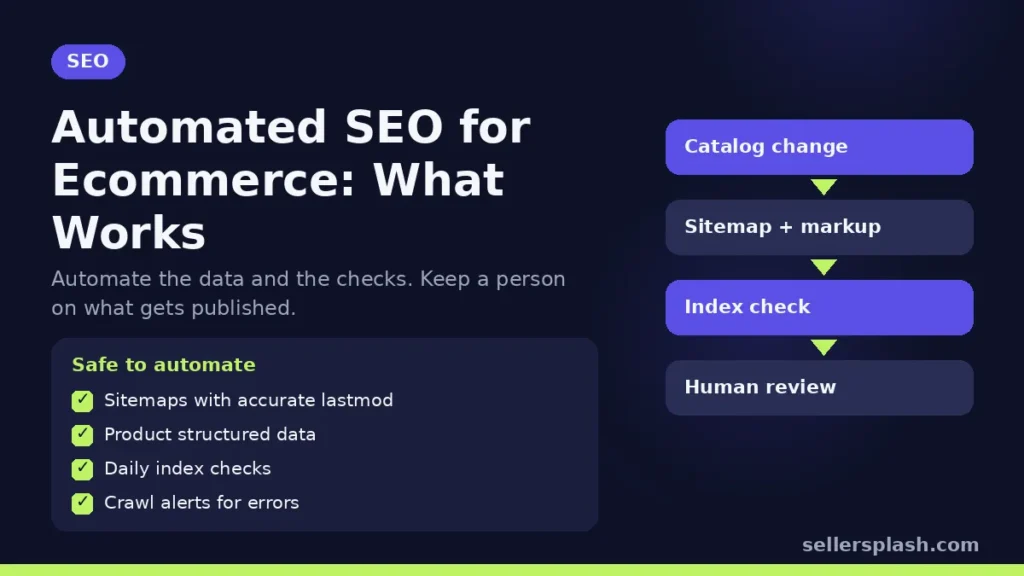
Automated SEO works for ecommerce when it handles the repetitive, rule based jobs: keeping sitemaps and structured data in sync with your catalog, checking pages for indexing problems, and flagging broken links or missing fields. It goes wrong when it is used to publish large numbers of pages nobody reviewed. Google's spam policies name that second pattern directly as scaled content abuse, "no matter how it's created." The safe line is simple: automate the data and the checks, and keep a person in charge of what gets published.
SEO Tasks That Are Safe to Automate
1. XML sitemaps that follow your catalog
Your platform should rebuild sitemaps whenever products are added, removed or changed. Google's sitemap guidelines limit a single sitemap to 50,000 URLs or 50 MB uncompressed, so larger catalogs need several sitemaps and a sitemap index. Google says it ignores the priority and changefreq values, and uses lastmod only when it is consistently and verifiably accurate. That means an automated lastmod should change only when the page really changed, not every night for every product.
2. Product structured data generated from the catalog
Product markup should come from the same database that drives the page, so price, availability and ratings in the markup always match what shoppers see. Google's product structured data documentation covers the properties it reads. There is a direct payoff in Merchant Center: with automatic item updates, Google can use the structured data on your product pages to update price, sale price, availability and condition in Shopping ads and free listings. Google's own example: if your feed says a product costs $4 and the page says $3, Google updates the listing to $3.
3. Image file names and alt text from product attributes
Templates can build a descriptive file name and alt text from the product name, color and variant. Google's image SEO guidance recommends short, descriptive file names, and gives the example that my-new-black-kitten.jpg is better than IMG00023.JPG. Review the template once; after that, every new product gets sensible image data without anyone typing it.
4. Indexing checks with the Search Console API
The URL Inspection API lets you check the index status of important pages in bulk. Google's usage limits allow 2,000 inspections per site per day and 600 per minute, which is enough to check top products and categories every day on most stores. Send the results to a sheet or dashboard and alert on pages that drop out of the index.
5. Change notifications to Bing and other IndexNow engines
IndexNow lets a site notify participating search engines when URLs are added, changed or deleted, with up to 10,000 URLs per request. Many platforms and plugins send these notifications automatically. Google is not part of IndexNow, and Google's own Indexing API can only be used for pages with JobPosting or BroadcastEvent markup, so it is not a tool for product pages.
6. Monitoring and alerts
Scheduled crawls of your own site catch the problems that quietly cost traffic: product pages returning errors, redirect chains after a URL change, noindex tags left on by mistake, and missing titles or descriptions on new products. Automation finds these; a person decides how to fix them.
What Not to Automate
Google's guidance on generative AI content says AI can be useful for research and for adding structure to original content, but using generative AI tools to create many pages without adding value for users may violate the scaled content abuse policy. The spam policies list examples, including generating many pages with AI without adding value and scraping feeds or search results to create content.
For a store, the risky patterns usually look like this:
- Thousands of near identical location or "best X for Y" pages created from one template
- Blog posts published daily with no editing, fact checks or first hand detail
- Product descriptions rewritten by a tool across the whole catalog without review
- Automated link exchanges between unrelated sites, which our post on choosing an SEO service discusses
AI assisted writing is not the problem by itself. Google's 2023 statement on AI generated content says its focus is on the quality of content, rather than how content is produced. A good test before anything goes live: would this page still be worth publishing if no search engine existed? If the honest answer is no, automation is making the problem bigger, not solving it.
A Simple Automated SEO Setup for a Store
| Task | How often | Who reviews |
|---|---|---|
| Sitemap rebuild with accurate lastmod | On every catalog change | Spot check monthly |
| Product structured data from the catalog | On every page render | Check after theme or app changes |
| Merchant Center automatic item updates | Continuous | Review diagnostics weekly |
| URL Inspection checks on key pages | Daily | Alert on changes |
| Site crawl for errors and noindex | Weekly | Fix list reviewed by a person |
| New content (guides, category copy) | As planned | Always edited before publishing |
Quick Checklist
- Sitemaps split under 50,000 URLs, lastmod only on real changes
- Product markup generated from live catalog data
- Automatic item updates turned on in Merchant Center
- Daily index checks on top products and categories
- IndexNow enabled for Bing and other participating engines
- A human editor on every page that gets published
Where an Agency Fits
Most stores have half of this running already through their platform and apps, and the other half missing. The useful work is checking that the automated parts are accurate and building the review step for content. Our AI search optimization service sets up the data side and writes reviewed, sourced content for stores that want both done properly.
Not sure what your store automates today? The Full AI Visibility Audit ($99) includes a site scan of crawler access and technical basics, and the Deep Growth Audit ($249) adds search, traffic and product feed checks with a 90 day plan.
Frequently Asked Questions
Is automated SEO safe for an online store?
Yes, for data and monitoring tasks such as sitemaps, structured data, image metadata and indexing checks. Google's spam policies warn against generating many pages without adding value for users, so publishing unreviewed content at scale is the part to avoid.
Does Google penalize AI written product descriptions?
Google says its focus is on whether content is helpful and original, not how it was made. Using AI to generate many pages without adding value may violate its scaled content abuse policy, so review AI drafts and add real product detail.
Can I use the Google Indexing API for product pages?
No. Google says the Indexing API can only be used for pages with JobPosting or BroadcastEvent markup. Use sitemaps and internal links for product pages instead.
How many URLs can I check with the URL Inspection API?
Google's published limit is 2,000 URL inspections per site per day and 600 per minute.
Does Google use the priority and changefreq tags in sitemaps?
No. Google says it ignores priority and changefreq, and uses lastmod only when it is consistently and verifiably accurate.
What does Merchant Center do with structured data on my product pages?
With automatic item updates, Google can use your product page structured data to update price, sale price, availability and condition in Shopping ads and free listings when they differ from your feed.
AI search and ads readiness checklist
25 checks for Amazon, Walmart and Shopify sellers: tracking, product feeds, Google, Bing and Meta ads, and getting cited by ChatGPT, Perplexity and Google AI Overviews. Two pages, about 20 minutes.
- Break-even ROAS table by margin
- The AI search (AEO) checks most stores miss
- A simple score that tells you what to fix first
No spam. We use your email to send the checklist and follow up about it.
Want to see where your store stands in AI search? Get the Full AI Visibility Audit for $99 or the Deep Growth Audit for $249.
Get your AI visibility audit