Product Structured Data for Ecommerce: Merchant Listings
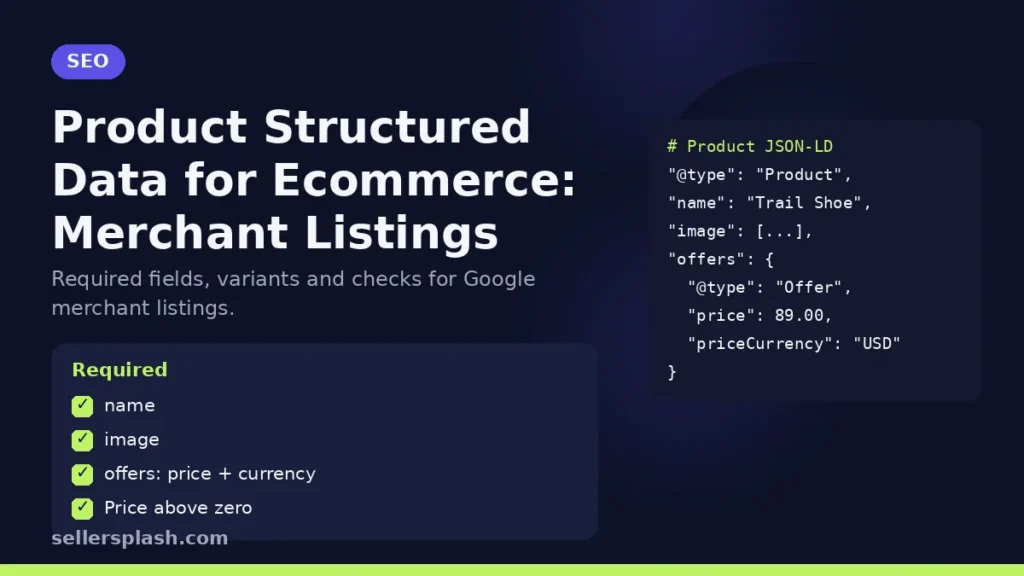
Product structured data is JSON-LD code on a product page that tells Google the product's name, image, price, currency and availability in a format it can read reliably. For an online store, the version that matters most is the markup for merchant listings: Google's merchant listing documentation says these results can highlight price, availability, shipping and return information. To qualify, a page must sell the product directly and include the required name, image and offers properties, with a price above zero. This guide walks through the required fields, the ones worth adding, how to handle variants and how to check your work.
Merchant Listings vs Product Snippets
Google supports two kinds of Product markup, and its intro to Product structured data explains the split:
| Merchant listings | Product snippets | |
|---|---|---|
| Who uses it | Pages where a shopper can buy the product | Editorial pages such as product reviews |
| Offer type | Offer only (you must be the seller) | Offer or AggregateOffer |
| Price | Must be greater than zero | Zero allowed |
| Extra details | Shipping, returns, variants, identifiers | Ratings, reviews, pros and cons |
If you run a store, use the merchant listing requirements on product pages. Review or comparison articles on your blog use product snippet markup instead.
The Required Properties
For merchant listings, Google lists three required properties on the Product itself:
- name: the product name.
- image: one or more product photo URLs. Google prefers pictures that clearly show the product, and its documentation recommends multiple high resolution images (at least 50,000 pixels when width is multiplied by height) in 16x9, 4x3 and 1x1 ratios. Image URLs must be crawlable and indexable.
- offers: a nested Offer. Merchant listings require an Offer rather than an AggregateOffer, because the merchant has to be the seller.
Inside the Offer, two properties are required: price (the current, active price) and priceCurrency in three letter ISO 4217 format, such as USD. Both can also sit inside a priceSpecification. If you supply both, Google says it uses offers.price and ignores the priceSpecification.
Recommended Properties Worth Adding
Required properties make a page eligible. Recommended ones give Google more to show and fewer reasons to guess:
- availability: one value, such as InStock, OutOfStock, PreOrder or BackOrder. Keep it in sync with your real stock.
- description, brand.name and color: plain facts that help Google match the product to searches.
- GTIN or other identifiers: Google asks for all applicable global identifiers and recommends the most specific GTIN type, in numeric form.
- shippingDetails: shipping rate, destination and handling and transit times.
- hasMerchantReturnPolicy: Google recommends a single store wide return policy under Organization markup, and offer level policies only where a product differs.
- aggregateRating: only for real reviews shown on the page, following the review snippet guidelines.
How to Handle Variants
Sizes and colors are where many stores go wrong. Google's product variants documentation uses a ProductGroup that holds the shared details, with each variant marked up as its own Product. Variants link to the group with inProductGroupWithID, or the group declares productGroupID. Each variant still needs the merchant listing required properties.
For single page setups, where one URL shows every option, Google says there must be one distinct canonical URL for the whole ProductGroup, typically the page without a variant preselected. If each variant has its own URL, every variant page carries its own markup.
Guidelines That Decide Eligibility
The technical guidelines add a few rules that markup alone cannot fix:
- Only pages where a shopper can purchase the product qualify, not pages that link to other sites that sell it.
- Product rich results support pages focused on a single product or variants of one product. A category page such as "shoes in our shop" is not a specific product.
- Google may verify merchant listing data before showing it, so the markup must match what the page shows.
Markup and Merchant Center Together
Google's Product overview says that providing both structured data on your pages and a Merchant Center feed maximizes eligibility and helps Google understand and verify your data. Some experiences combine the two. For example, product snippets may use pricing from your feed if the page markup lacks it. If you already run a feed, our guide to Google Shopping feed optimization covers the feed side.
How to Check Your Markup
- Paste a product URL into the Rich Results Test and fix critical errors first.
- Deploy on a few pages, then use the URL Inspection tool in Search Console to see how Google renders them.
- Confirm the price, currency and availability in the markup match the visible page, including during sales.
- Recheck after theme or app updates, which often change how markup is generated.
Product markup works best on pages that already answer buyer questions. Our product page SEO guide covers titles, copy and images, and our FAQ schema post explains what FAQ markup still does.
Quick Checklist
- Every product page has name, image and an Offer with price and priceCurrency
- Price above zero and identical to the visible price
- Availability set with one value and kept in sync
- GTIN, brand, shipping and return details added where you have them
- Variants grouped with ProductGroup
- Rich Results Test passes with no critical errors
Where an Agency Fits
Clean product data now feeds organic results, Shopping and AI assistants at once. Our AI search optimization service fixes product markup and feeds together so every channel reads the same facts.
Not sure what Google can read on your product pages? The Full AI Visibility Audit ($99) reviews how search and AI assistants see your brand, and the Deep Growth Audit ($249) adds search, traffic, ads and product feed checks with a 90 day plan.
Frequently Asked Questions
What is the difference between merchant listings and product snippets?
Merchant listings are for pages where a shopper can buy the product and require an Offer with a price above zero. Product snippets are for editorial pages such as reviews and accept an Offer or AggregateOffer.
Which properties are required for merchant listings?
Google requires name, image and offers on the Product, and price and priceCurrency inside the Offer.
Can a category page use Product structured data?
Google says product rich results support pages focused on a single product or variants of one product, so a general category page does not qualify.
How should I mark up size and color variants?
Use a ProductGroup for the shared details and mark each variant as a Product linked with inProductGroupWithID, following Google's product variants documentation.
Do I still need markup if I have a Merchant Center feed?
Google says providing both structured data and a Merchant Center feed maximizes eligibility and helps it verify your data.
How do I test product structured data?
Run the page through the Rich Results Test, fix critical errors, then check how Google sees the page with the URL Inspection tool in Search Console.
AI search and ads readiness checklist
25 checks for Amazon, Walmart and Shopify sellers: tracking, product feeds, Google, Bing and Meta ads, and getting cited by ChatGPT, Perplexity and Google AI Overviews. Two pages, about 20 minutes.
- Break-even ROAS table by margin
- The AI search (AEO) checks most stores miss
- A simple score that tells you what to fix first
No spam. We use your email to send the checklist and follow up about it.
Want to see where your store stands in AI search? Get the Full AI Visibility Audit for $99 or the Deep Growth Audit for $249.
Get your AI visibility audit