IndexNow for Ecommerce: Faster Indexing in Bing
IndexNow is a free, open protocol that lets your store tell search engines the moment a URL is added, updated or deleted, instead of waiting for them to recrawl. You host a key file on your domain, then send the changed URLs to one participating endpoint, and the IndexNow documentation says participating engines automatically share submissions with each other. Bing is the best known of them, and the Bing Webmaster Tools IndexNow page describes it as a way to get content discovered faster. For stores with frequent price, stock and product changes, it is one of the simplest technical wins. Here is how it works and how to set it up.
How IndexNow Works
- You create a key and host it as a text file on your site.
- When a page changes, you send its URL with your key to an IndexNow endpoint.
- The engine checks the key file to confirm you own the site, then shares the URL with the other participating engines.
The IndexNow FAQ lists endpoints for the global IndexNow API, Amazon, Bing, Naver, Seznam.cz, Yandex and Yep, and says you only need to submit to one of them. Google is not among the engines listed, so Google discovery still relies on sitemaps, links and Search Console.
How to Set It Up
Option 1: Use your platform or plugin
The FAQ recommends checking your CMS, host or SEO plugin first, and lists WordPress, Shopify, Wix, Drupal, Joomla!, PrestaShop, Shopware, OpenCart and others as offering native integration or support through plugins. It also notes that Cloudflare offers native IndexNow support. If your stack is on that list, turning it on is usually the whole job.
Option 2: Set it up yourself
The documentation gives the rules:
- Key: at least 8 and at most 128 hexadecimal characters.
- Key file: a UTF-8 text file named after the key, containing the key, hosted at the root of your site. A file in another folder is allowed if you pass its location, but the documentation strongly recommends the root.
- Single URL: a GET request to an endpoint with the changed URL and your key.
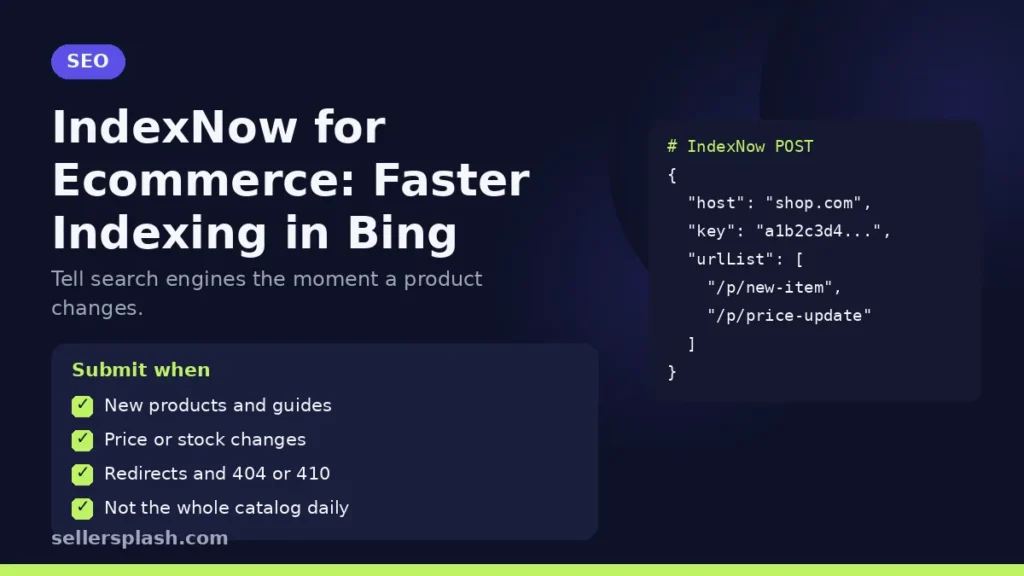
- Bulk: a JSON POST with your host, key and a urlList of up to 10,000 URLs per request.
What the Responses Mean
| Code | Meaning |
|---|---|
| 200 | URL submitted successfully |
| 202 | URL received, key validation pending |
| 400 | Bad request, invalid format |
| 403 | Key not valid, for example key file missing or key not in the file |
| 422 | URLs do not belong to the host, or key does not match the protocol |
| 429 | Too many requests, potential spam |
The FAQ notes that a first request can return 202 while the engine verifies your key.
Which Store URLs to Submit
The FAQ says to notify IndexNow whenever content is added, updated or removed, and to submit redirected pages and pages returning 404 or 410 so engines can update or drop them. For a store that means:
- New product and category pages
- Price, stock or description changes on product pages
- Discontinued products that now redirect or return 404 or 410
- New buying guides and blog posts
Two limits to keep in mind from the same FAQ: every submitted URL counts toward your crawl quota, and submitting a URL does not guarantee immediate indexing. Submit what really changed, not your whole catalog every day.
IndexNow and Sitemaps Together
IndexNow does not replace your sitemap. The FAQ recommends IndexNow for high priority or frequently changing pages and an XML sitemap as the complete inventory of your URLs, and says using both improves visibility. Keep your sitemap clean and submitted in Search Console, and check indexing in each engine's own tools. Our Search Console guide covers the Google side.
Why It Matters for AI Search
The IndexNow FAQ says faster submission helps keep your content current in AI powered search results. Assistants that ground answers in a search index can only quote a price or product they have seen, so fresh indexing supports the work in our answer engine optimization guide.
Quick Checklist
- IndexNow enabled in your platform, plugin or CDN, or a key file at the site root
- Product, category and guide changes submitted when they happen
- Redirects and deleted pages submitted too
- Responses checked: 200 or 202, not 403 or 422
- XML sitemap still live and submitted
- Indexing checked in each engine's webmaster tools
Where an Agency Fits
Indexing is the first step to being found by search engines and AI assistants. Our AI search optimization service sets up IndexNow, sitemaps and product data so new pages are picked up quickly.
Want to know which of your pages search engines and assistants can actually see? The Full AI Visibility Audit ($99) reviews how search and AI assistants see your brand, and the Deep Growth Audit ($249) adds search, traffic, ads and product feed checks with a 90 day plan.
Frequently Asked Questions
What is IndexNow?
IndexNow is a free, open protocol that lets a site notify participating search engines when URLs are added, updated or deleted, so they can be crawled sooner.
Which search engines use IndexNow?
The IndexNow FAQ lists endpoints for the global IndexNow API, Amazon, Bing, Naver, Seznam.cz, Yandex and Yep. Submissions to one are shared with the others.
Does IndexNow work for Google?
Google is not among the engines listed on the IndexNow FAQ, so use sitemaps and Search Console for Google.
How many URLs can I submit at once?
The IndexNow documentation allows up to 10,000 URLs per POST request.
Does IndexNow guarantee indexing?
No. The IndexNow FAQ says submitting a URL does not guarantee immediate indexing, and each engine decides whether to index it.
Should I still use an XML sitemap?
Yes. The IndexNow FAQ recommends IndexNow for changing pages and a sitemap as the complete inventory of your URLs.
AI search and ads readiness checklist
25 checks for Amazon, Walmart and Shopify sellers: tracking, product feeds, Google, Bing and Meta ads, and getting cited by ChatGPT, Perplexity and Google AI Overviews. Two pages, about 20 minutes.
- Break-even ROAS table by margin
- The AI search (AEO) checks most stores miss
- A simple score that tells you what to fix first
No spam. We use your email to send the checklist and follow up about it.
Want to see where your store stands in AI search? Get the Full AI Visibility Audit for $99 or the Deep Growth Audit for $249.
Get your AI visibility audit