How to Exclude Existing Customers in Meta Ads
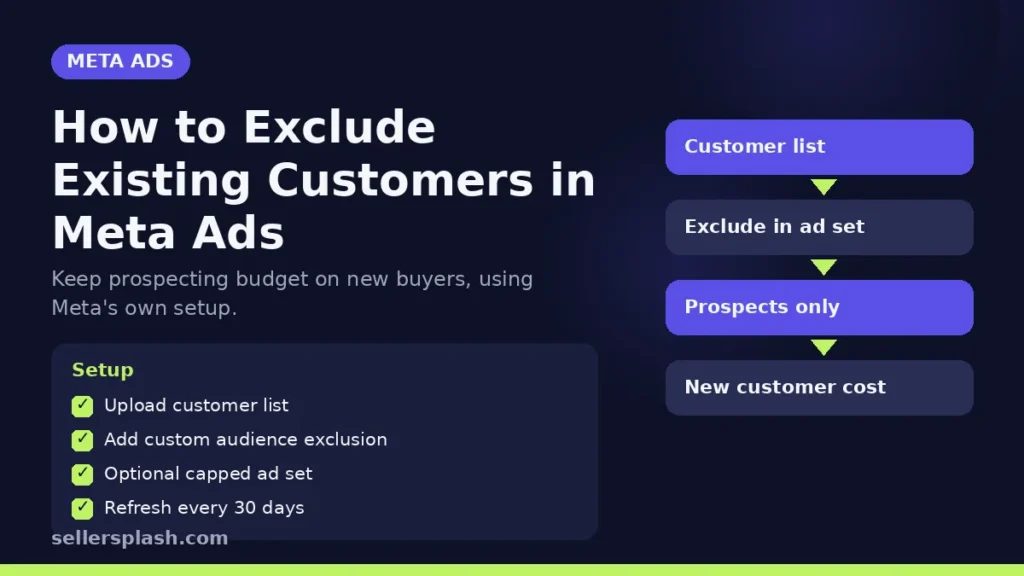
To exclude existing customers in Meta ads, upload your customer list as a custom audience, then add it as a custom audience exclusion in the ad set's audience controls. Meta's custom audience guide gives exactly this example: exclude an audience of your current customers when you run a campaign to win new ones. If you want some spend on past buyers but not too much, Meta's help article on replicating the existing customer budget cap shows a two ad set setup with a spending limit. This guide covers both, plus how to keep the list accurate.
Why Stores Exclude Existing Customers
Prospecting campaigns are meant to find new buyers. When past customers see those ads, they often click and buy anyway, which makes the campaign look stronger than it is and spends budget on sales you might have had through email or direct visits. Excluding them gives you a cleaner read on new customer acquisition and keeps retargeting and loyalty messages in their own campaigns.
It also matters for automation. Meta's help article notes that the existing customer budget cap, which let Advantage+ sales campaign advertisers control spend on existing customers, is no longer available, and that you can do the same thing manually. The manual methods are below.
Step 1: Build Your Existing Customer Audience
Meta's custom audience overview lists several ways to define who your customers are. For a store, the most useful are:
| Audience type | What it uses | Best for |
|---|---|---|
| Customer list | Emails or phone numbers you upload | Everyone who has ever bought |
| Website custom audience | Meta Pixel events such as Purchase | Recent buyers, updated automatically |
| Catalog custom audience | Interactions with items in your catalog | Shoppers who viewed or bought specific products |
| Offline activity | In store purchases and other offline actions | Stores with physical locations |
For the customer list, Meta says the data is hashed before matching, which turns identifiers into randomized code that cannot be reversed. Export buyers from your store platform, upload the file, and map columns such as email and phone so Meta can match them.
Two practical notes from Meta's documentation:
- An audience should show Ready under Status before you use it. Outdated means the customer list has not been updated in over 30 days, which may affect delivery.
- Meta recommends a custom audience include at least 1,000 customers.
If the list should only ever be used to keep people out, Meta offers an exclusion-only custom audience. It is a customer list audience that can only be used to exclude people, and once created it cannot be changed into a regular custom audience.
Step 2: Exclude Them From a Prospecting Campaign
Meta's steps for a campaign that spends nothing on existing customers:
- Open Ads Manager and create a new campaign.
- Choose Campaign budget as the budget strategy and set a daily or lifetime budget.
- Go to Audience, select Show more controls under Controls, and add your customer audiences as a Custom audience exclusion.
- Choose your creative at the ad level and publish.
Campaigns that use Advantage+ audience have the same option. Meta's audience controls article lists custom audiences to exclude among the controls, alongside locations, minimum age and languages. Controls limit who can see your ads, unlike audience suggestions, which only guide delivery.
Step 3 (Optional): Cap Spend on Existing Customers
Sometimes you want a little spend on past buyers, for example during a sale. Meta's two ad set method works like this:
- Create a campaign with Campaign budget.
- Ad set 1: under Budget and schedule, set an ad set spending limit as a daily or lifetime maximum, either a percentage or a fixed amount. Under Audience, switch setup to include the custom audiences you consider existing customers and uncheck Use as a suggestion.
- Ad set 2: duplicate the ad set, then exclude the same customer audiences so it spends the rest on prospects.
- Use the same creative in both ad sets and publish.
Meta notes that a percentage limit scales with the budget, while a fixed dollar amount stays static, and that it will aim to spend no more than the maximum.
Keep the Exclusion Accurate
- Refresh the customer list at least monthly so it never shows Outdated.
- Combine sources: a customer list catches all buyers, and a Purchase based website audience catches the newest ones between uploads.
- Check tracking: Pixel based audiences only work if Purchase events fire. Our Conversions API setup guide covers server side events.
- Read results by audience: compare cost per new customer before and after the change, not only blended return on ad spend. Our break even guide for Meta ads shows how to set the target.
Quick Checklist
- Customer list uploaded and showing Ready
- Purchase based website audience created as a backup
- Prospecting campaigns exclude both audiences
- Retargeting and loyalty kept in separate campaigns
- Optional capped ad set for existing customers during promotions
- List refreshed at least every 30 days
Where an Agency Fits
Clean audience structure is the base of profitable prospecting. Our Meta ads agency team sets up exclusions, tracking and budgets so new customer cost is measured honestly.
Want to know how much of your Meta budget reaches people who already bought? The Full AI Visibility Audit ($99) reviews how search and AI assistants see your brand, and the Deep Growth Audit ($249) adds search, traffic, ads and product feed checks with a 90 day plan.
Frequently Asked Questions
How do I exclude past customers from Facebook and Instagram ads?
Create a custom audience of your customers, then in the ad set go to Audience, select Show more controls and add it under custom audience exclusion.
What happened to the existing customer budget cap?
Meta says the existing customer budget cap for Advantage+ sales campaigns is no longer available, and shows how to get the same result manually with exclusions and ad set spending limits.
What is an exclusion-only custom audience?
It is a customer list custom audience that can only be used to exclude people. Meta says it cannot later be changed into a regular custom audience.
How big should my customer list be?
Meta recommends that a custom audience includes at least 1,000 customers.
How often should I update my customer list?
Meta marks a customer list as Outdated when it has not been updated in over 30 days, which may affect delivery, so refresh it at least monthly.
Is my customer data safe when I upload it?
Meta says customer list data is hashed before matching, turning identifiers into randomized code that cannot be reversed.
AI search and ads readiness checklist
25 checks for Amazon, Walmart and Shopify sellers: tracking, product feeds, Google, Bing and Meta ads, and getting cited by ChatGPT, Perplexity and Google AI Overviews. Two pages, about 20 minutes.
- Break-even ROAS table by margin
- The AI search (AEO) checks most stores miss
- A simple score that tells you what to fix first
No spam. We use your email to send the checklist and follow up about it.
Want to see where your store stands in AI search? Get the Full AI Visibility Audit for $99 or the Deep Growth Audit for $249.
Get your AI visibility audit