Black Friday Ads Checklist for Google and Meta
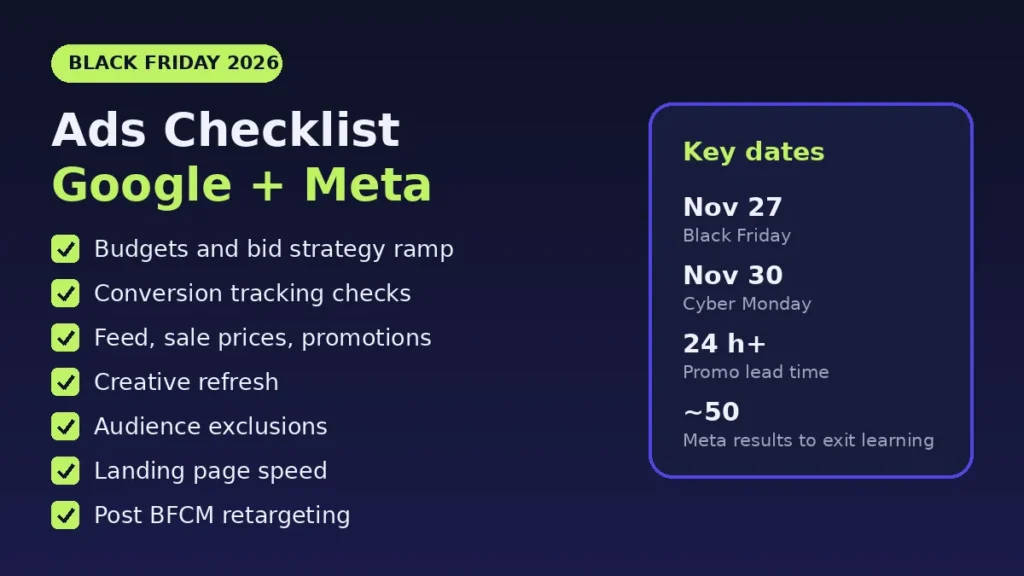
A Black Friday ads checklist for Google and Meta comes down to seven areas: budgets and bidding, conversion tracking, your product feed and promotions, fresh creative, audience exclusions, landing page speed, and a plan for retargeting after Cyber Monday. Black Friday 2026 falls on November 27 and Cyber Monday on November 30, so most of this work should be done by mid November. Several steps need lead time on the platforms themselves: Google says a Merchant Center promotion review can take up to 72 hours, and Meta says an ad set usually leaves the learning phase after about 50 results in the week after its last significant edit.
Below is the checklist we work through on ecommerce accounts before the peak, with the official source behind each setting. It is written for store owners and in house marketers running their own Google Ads and Meta campaigns.
Quick Checklist
- Budgets and bidding: raise budgets on profitable campaigns before peak days, and use a Google seasonality adjustment only for the sale window itself.
- Conversion tracking: confirm every purchase action shows a healthy status in Google Ads and that Meta receives purchases through the Pixel and the Conversions API.
- Feed and promotions: load sale prices with effective dates and submit Merchant Center promotions at least 24 hours before they start.
- Creative: launch new Black Friday creative early enough to clear review and learning.
- Audiences: exclude recent buyers from prospecting and build retargeting lists now.
- Landing pages: check that sale pages load fast on mobile and show the same price as the ad.
- After the sale: plan retargeting and budget step downs for December.
1. Budgets and Bid Strategy Ramp
On Google Ads, budget changes are safe to make close to the event. Google states that updates to budgets, ROI targets or targeting settings take effect in the next auction but never trigger a Learning status. What does trigger learning is a structural change, such as switching bid strategy or changing the conversion goals a campaign optimizes toward. That is the main reason not to rebuild campaigns or swap bid strategies in Black Friday week.
Two budget facts to plan around:
- Google can spend up to 2 times your average daily budget on a given day, and the monthly limit for most campaigns is 30.4 times the average daily budget. If you double a daily budget on Black Friday, the real ceiling for that day is higher than the number you typed.
- If you expect your conversion rate to jump because of a sitewide sale, a seasonality adjustment can tell Smart Bidding in advance. Google says Smart Bidding already manages seasonal events, and that seasonality adjustments are ideal for short events of 1 to 7 days. Set it for the sale window only, then let it end.
On Meta, use budget scheduling instead of editing budgets by hand at midnight. Meta lets you add up to 50 high demand periods per campaign or ad set, each at least 3 hours long, and the scheduled budget cannot exceed 8 times the daily budget. Budget scheduling only works on campaigns with a daily budget.
Our rule of thumb: put extra budget behind campaigns that already hit your target return in October, and keep test budgets small during the peak, when every edit costs more.
2. Conversion Tracking Checks
Every bidding decision during Black Friday rests on purchase data, so check tracking before you change anything else.
- Google Ads status: open Goals and read the status column for each purchase action. Google's conversion tracking troubleshooter explains each one. For example, Misconfigured means conversions stopped recording because of a setup error or broken tag, and Awaiting conversions means none were recorded in the last 7 days.
- Enhanced conversions: Google's enhanced conversions sends hashed first party data, such as an email address, alongside your conversion tags to improve measurement. If it is not on yet, turn it on early so it has time to record data before the peak.
- Meta Pixel and Conversions API: Meta's Conversions API sends events from your server, alongside the Pixel in the browser. In Events Manager, check Event Match Quality, a score from 0 to 10 for how well your server events match Meta accounts. Meta calculates it from the last 48 hours of data, so test a purchase and recheck a few days before Black Friday.
- Values and duplicates: place a real test order and confirm the purchase value in Google Ads, GA4 and Meta matches the order total, and that each order counts once. Our GA4 ecommerce tracking guide covers the event checks step by step.
3. Product Feed, Sale Prices and Promotions
For Shopping and Performance Max, the feed is the ad. Three checks matter most for Black Friday:
- Sale prices with dates. Use the sale price effective date attribute so the sale price shows only during the sale. Google recommends including start and end times with a time zone. Without a time, the sale runs from midnight on the start date to 11:59 PM on the end date, and without a time zone Google uses UTC.
- Promotions submitted early. Google recommends submitting promotions at least 24 hours before the start time, and says review is typically done within 24 hours of the start time but can take up to 72 hours. Products should be mapped to the promotion 24 hours before it starts, per the Promotions setup guide. In the US, eligible promotions can also appear on Google's deals page on Search.
- Price matches the page. The price in the feed, the sale price and the price on the landing page should agree at every hour of the sale. Disapprovals in Black Friday week are slow to fix. Our Google Shopping feed optimization guide lists the fixes to make first.
4. Creative Refresh
Launch Black Friday creative before the peak, not on the day. On Google, new or edited creative does not trigger a Learning status but must pass policy review before it serves. On Meta, a new ad or a significant edit can put an ad set back into the learning phase, and Meta advises editing only when you expect the change to improve performance and combining similar ad sets so learnings are shared.
Practical steps:
- Build distinct concepts, not small variations of one ad. Meta's guidance on creative diversification explains why varied concepts help its delivery system reach different buyers.
- Prepare versions for each phase: early access, the Black Friday offer itself, Cyber Monday, and a last chance message.
- State the offer the same way in the ad, the feed and the landing page.
- Upload everything early and schedule start dates, so review happens before the rush.
5. Audience Exclusions
Prospecting budget is expensive in late November, so stop spending it on people who already bought.
- Meta: with Advantage+ audience, audience controls let you set custom audiences to exclude, along with locations, minimum age and languages. Exclude recent purchasers from prospecting, then reach them in a separate campaign with an offer made for them.
- Google: build your data segments from site visitors and customer lists now, so the lists have members by the time you need them. Google closes a segment that is not used in targeting for 540 days, so check older lists still exist.
- Website audiences: Meta notes that a website custom audience starts filling from the day you create it and does not backfill. Create cart abandoner and product viewer audiences before Black Friday traffic arrives.
6. Landing Page Speed
Paid traffic lands on your slowest pages at the worst time: sale pages often carry new banners, countdown timers and app scripts added in November. Google's web.dev guidance says a good Largest Contentful Paint is 2.5 seconds or less, measured at the 75th percentile of page loads on mobile and desktop.
- Test the exact URLs in your ads on a phone, not only the homepage.
- Compress hero images and remove apps or scripts you will not use during the sale.
- Check that the sale price, shipping cutoffs and stock status are visible without scrolling.
7. Post BFCM Retargeting Plan
The days after Cyber Monday are when the audiences you built pay off. Before the sale ends, decide:
- Which offer cart abandoners and product viewers get in December, if any, and when it ends.
- When budgets step back down, and when any seasonality adjustment ends, so Smart Bidding does not keep expecting sale level conversion rates.
- How you will reach new buyers again, such as gift guides, bundles or accessories, while excluding them from discount heavy ads.
- Shipping cutoff messages for holiday delivery, updated in both ads and landing pages.
If you want a second pair of eyes on all of this, our Google Ads management and Meta ads agency teams run these checks on client accounts every season. For the Google side in more depth, see our Black Friday Google Ads prep plan.
Want this checked on your store before Black Friday? The Deep Growth Audit ($249) reviews your search, traffic and product feed, including Merchant Center issues, and gives you a 90 day action plan. The Full AI Visibility Audit ($99) shows whether AI search recommends your store and what to fix.
Frequently Asked Questions
When should I start preparing Black Friday ads?
Start now. Black Friday 2026 is November 27 and Cyber Monday is November 30. Google Merchant Center promotions can take up to 72 hours to review, Meta ad sets usually need about 50 results in a week to leave the learning phase, and new creative must pass policy review before it serves. Building and launching early leaves time for all of that before peak days.
Should I raise my Google Ads budget for Black Friday?
Usually yes, for campaigns that are profitable and limited by budget. Google says budget changes take effect in the next auction and never trigger a Learning status, and a campaign can spend up to 2 times its average daily budget on a given day. Plan the total you are comfortable spending per day across the peak, not only the daily setting.
Do I need a seasonality adjustment for Black Friday in Google Ads?
Only if you expect a major change in conversion rate, such as a sitewide sale. Google says Smart Bidding already manages seasonal events and that seasonality adjustments work best for short events of 1 to 7 days. Use one for the sale window itself, not for the whole month.
How do I schedule a bigger Meta budget for Black Friday?
Use budget scheduling on a campaign or ad set with a daily budget. You can add up to 50 high demand periods, each at least 3 hours long, and the scheduled total cannot exceed 8 times the daily budget, according to Meta's help center.
Should I exclude past buyers from Black Friday prospecting ads?
In most accounts, yes. Meta's Advantage+ audience lets you set custom audiences to exclude as an audience control, and Google Ads lets you build your data segments from customer lists and site visitors. Excluding recent buyers keeps prospecting budget on new customers, and you can reach buyers separately with an offer made for them.
What should I do with ads after Cyber Monday?
Do not switch everything off at once. Bring budgets and any seasonality settings back to normal, keep conversion tracking running, and retarget the visitors and cart abandoners you paid to reach during the sale, using offers that fit December gift shopping and shipping cutoffs.
AI search and ads readiness checklist
25 checks for Amazon, Walmart and Shopify sellers: tracking, product feeds, Google, Bing and Meta ads, and getting cited by ChatGPT, Perplexity and Google AI Overviews. Two pages, about 20 minutes.
- Break-even ROAS table by margin
- The AI search (AEO) checks most stores miss
- A simple score that tells you what to fix first
No spam. We use your email to send the checklist and follow up about it.
Want to see where your store stands in AI search? Get the Full AI Visibility Audit for $99 or the Deep Growth Audit for $249.
Get your AI visibility audit